


خرید اشتراک Google AI Pro؛ ۸ نکته قبل از فعالسازی
خرید اشتراک Google AI Pro فقط به معنی دسترسی به نسخه قویتر Gemini نیست. این پلن مجموعهای از امکانات هوش مصنوعی، فضای ذخیرهسازی Google One و قابلیتهایی در بعضی سرویسهای Google…
برای ساخت یک عکس پروفایل حرفهای با هوش مصنوعی، فقط نوشتن عبارتی مثل «یک پرتره سینمایی بساز» یا «یک عکس پروفایل حرفهای میخواهم» کافی نیست. تفاوت اصلی زمانی دیده میشود که داخل پرامپت، زاویه دوربین، نوع نور، لباس، محیط، حالت چهره و حس نهایی تصویر را دقیق مشخص کنید. در این مقاله…
برای ساخت یک عکس پروفایل حرفهای با هوش مصنوعی، فقط نوشتن عبارتی مثل «یک پرتره سینمایی بساز» یا «یک عکس پروفایل حرفهای میخواهم» کافی نیست. تفاوت اصلی زمانی دیده میشود که داخل پرامپت، زاویه دوربین، نوع نور، لباس، محیط، حالت چهره و حس نهایی تصویر را دقیق مشخص کنید.
در این مقاله ۷ پرامپت ساخت عکس با هوش مصنوعی را همراه با نمونه خروجی واقعی میبینید؛ از یک پرتره سینمایی در مترو تا عکاسی فشن، سیاهوسفید، نورپردازی Chiaroscuro و استایل کلاسیک هالیوودی.
هدف این مجموعه این است که ببینیم یک تصویر مرجع ثابت، فقط با تغییر Prompt، تا چه اندازه میتواند خروجیهای متفاوتی ایجاد کند.
یک پرامپت ساخت عکس با هوش مصنوعی زمانی نتیجه دقیقتری میدهد که اطلاعات اصلی تصویر را برای مدل روشن کند. مهمترین بخشها معمولاً این موارد هستند:
لازم نیست همیشه همه این موارد را داخل Prompt بنویسید. برای یک تصویر ساده شاید چند مورد کافی باشد، اما هرچه کنترل بیشتری روی نور، زاویه، ترکیببندی و استایل بخواهید، تعریف دقیق این جزئیات اهمیت بیشتری پیدا میکند.
راهنماهای رسمی ابزارهای تولید تصویر هم روی توصیف واضح سوژه، محیط و سبک تصویر تأکید دارند. برای مثال میتوانید راهنمای رسمی ساخت تصویر با Gemini را ببینید.
این پرامپتها به یک ابزار خاص محدود نیستند. میتوانید ساختار آنها را در ابزارهای هوش مصنوعی مختلف استفاده یا متناسب با مدل موردنظر خود بازنویسی کنید.
برای مثال، ابزارهایی مثل Gemini و ChatGPT در نسخهها و قابلیتهای پشتیبانیشده میتوانند برای تولید یا ویرایش تصویر استفاده شوند. ابزارهایی مثل Claude هم برای نوشتن، تحلیل و بهینهکردن Prompt کاربرد دارند؛ بنابراین میتوانید ابتدا پرامپت را اصلاح کنید و بعد آن را در ابزار تولید تصویر موردنظر اجرا کنید.
اگر از Gemini استفاده میکنید و نمیدانید نسخه رایگان برایتان کافی است یا نه، مقاله تفاوت Gemini رایگان و Google AI Pro را بخوانید.
اگر به امکانات بیشتر Gemini نیاز دارید، در راهنمای خرید اشتراک Google AI Pro نکات مربوط به حساب مقصد، محدودیتها و فعالسازی را توضیح دادهایم.
برای آشنایی با گزینههای دیگر مثل ChatGPT، Claude و سایر سرویسهای AI هم میتوانید راهنمای خرید اکانت هوش مصنوعی را ببینید.
در این نمونه، سوژه کاملاً در فوکوس باقی میماند، اما جمعیت اطراف با Motion Blur نمایش داده میشوند. همین تضاد باعث میشود تصویر حس یک فریم فیلم را پیدا کند.
Prompt:
Create an image
Slow-motion cinematic side profile shot of me walking against a rushing metro station crowd, all others are blurred with motion trails, I’m in focus with a serious face, wearing a long trench coat. Cool blue tones, 35mm film look
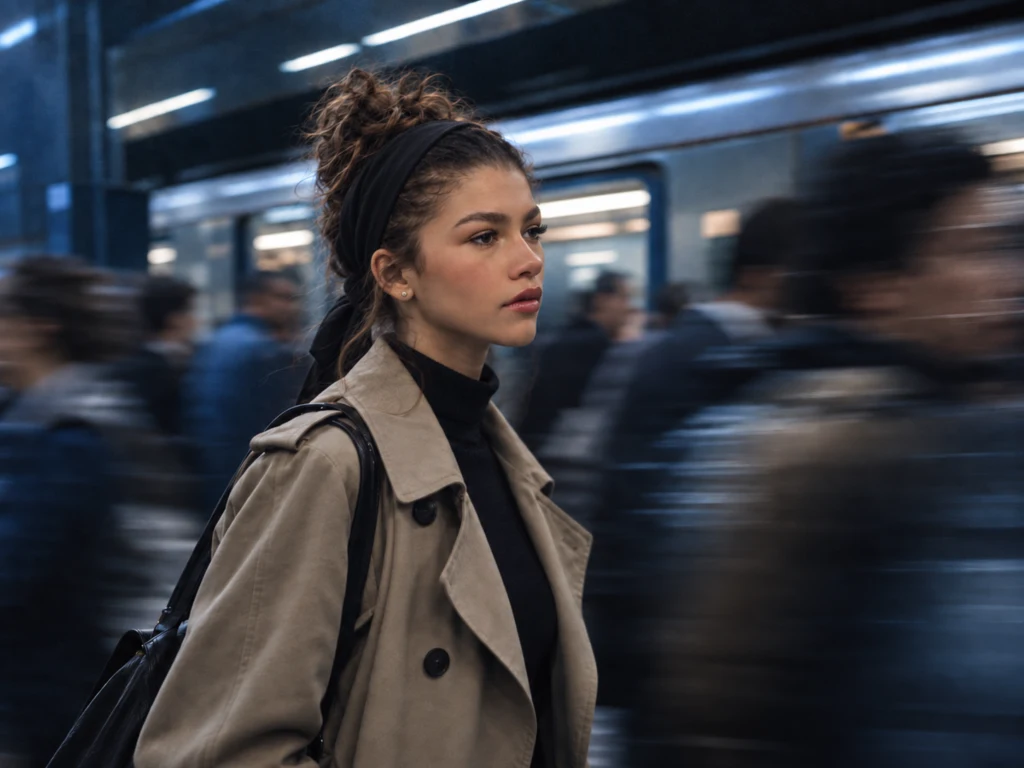
چرا نتیجه جذاب است؟ چون سه چیز خیلی واضح تعریف شدهاند: سوژه ثابت، محیط پرتحرک و استایل 35mm. اگر این سه بخش را حذف کنید، خروجی معمولاً عمومیتر و کمهویتتر میشود.
برای شخصیسازی: میتوانید metro station را با airport، busy street یا train station جایگزین کنید و رنگ تصویر را از Cool Blue به Warm Cinematic تغییر دهید.
این Prompt برای ساخت عکسهایی مناسب است که حس کمپین فشن، جلد مجله یا عکاسی استودیویی لوکس دارند.
Prompt:
Hyper-realistic close-up portrait of a charismatic female model, editorial luxury fashion style.

Sharp, cinematic dual-tone lighting with warm amber/orange-pink beams and cool icy blue light crossing her face, creating dramatic contrast and depth.

High cheekbones, defined jawline, symmetrical facial structure, intense confident gaze, ultra-detailed skin texture.
She wears a dark tailored velvet blazer with a clearly visible soft texture, collar slightly open, revealing a minimal silver chain necklace.

Background fades smoothly into a deep charcoal gradient, enhanced with cinematic haze, subtle light flares, and a delicate layer of fog curling around her silhouette.
Moody, modern, high-fashion atmosphere — luxury magazine cover, refined mystery, elegant editorial aesthetic.
Ultra-sharp focus, shallow depth of field, studio photography, 85mm lens look, high contrast, cinematic color grading, 8K realism.
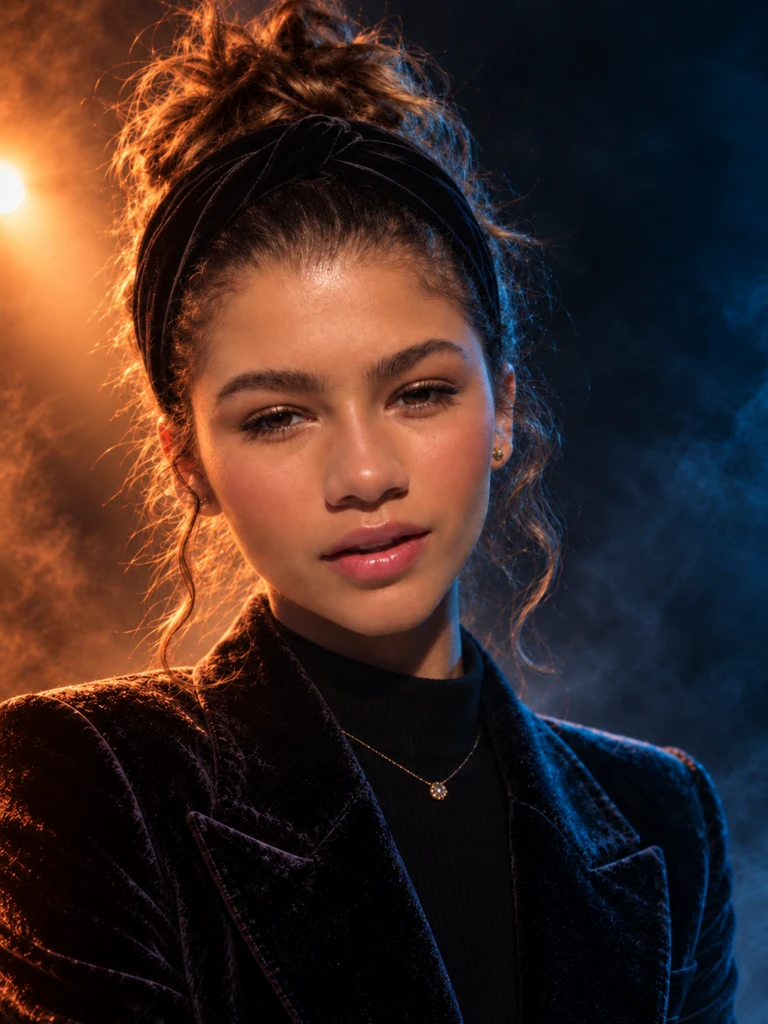
بخش مهم این Prompt، تضاد نور گرم Amber با نور سرد Blue است. همین ترکیب باعث میشود فرم صورت بهتر از پسزمینه جدا شود و تصویر عمق بیشتری بگیرد.
میتوانید رنگ نور، نوع کت، پسزمینه و حتی عبارت luxury magazine cover را برای رسیدن به استایل متفاوت تغییر دهید.
اگر دنبال یک پرتره آرام، جدی و کمی مرموز هستید، این ترکیب نور گرم جانبی و فضای تاریک میتواند نتیجه جذابی ایجاد کند.
Prompt:
A cinematic portrait based on the composition and lighting of the reference description, but featuring the face of the person from the user’s provided image. This person, with their specific facial structure and skin tone, is sitting in a dark leather armchair. Dramatic chiaroscuro lighting from the left casts a warm orange glow across the left side of their face, white unbuttoned shirt, and hand resting on their chin, while the right side of their face and body fades into deep shadow. Their expression is calm and slightly mysterious, looking directly at the camera. The pose, with legs crossed and one hand on the armrest, is maintained. The room is dimly lit, moody, and atmospheric.
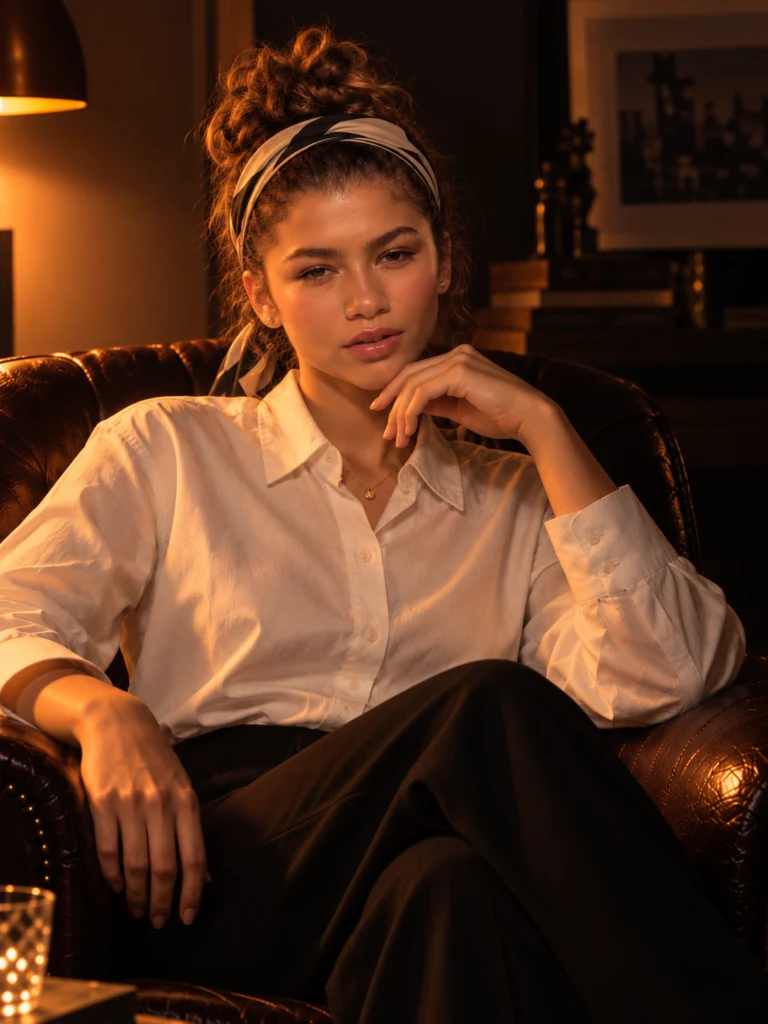
کلمه کلیدی این Prompt از نظر بصری Chiaroscuro است؛ یعنی استفاده از اختلاف شدید نور و سایه برای فرمدادن به سوژه.
برای تغییر حس تصویر میتوانید رنگ نور را تغییر دهید یا leather armchair را با classic sofa، office chair یا library chair جایگزین کنید.
در این نمونه، خود سایه بخشی از Composition است. مستطیل نور و سایه پروفایل روی دیوار باعث میشوند تصویر گرافیکیتر و کنترلشدهتر دیده شود.
Prompt:
Replace the face of the subject in the provided black and white artistic portrait with the face of the person from the uploaded image. Do not stylize or modify the inserted face to match the original subject’s features — instead, preserve the person’s original facial structure and identity exactly, and adapt it naturally to match the lighting, angle, and tone of the scene.

Camera angle and distance:
The photo is shot from a slight side angle — approximately 30–40 degrees to the left of the subject’s face. The camera is positioned slightly above eye-level, looking downward at a soft diagonal. The framing is a mid-shot, showing the subject seated in a chair with the torso leaning back and the face in profile, slightly turned downward and away from the light source.

Lighting and shadow:
The lighting is dramatic, high-contrast, and monochrome. A strong directional light shines from the right side of the frame, casting a bold and sharp-edged shadow of the subject’s profile onto the wall on the left. The subject’s face is partially illuminated on the far side, while the near side (facing the camera) is left mostly in shadow. The result is sculptural, moody, and minimalist.

Pose and body:
The subject is seated slightly slouched in a modern, armless chair, with a relaxed and introspective posture. The head is tilted slightly downward, and the face is captured in semi-profile view. The hands are not visible or minimally included near the waist. The expression should remain neutral, calm, and inward-looking.

Composition:
The background is clean, flat, and dark, with a clear rectangular window-shaped light source projected on the wall, creating a dramatic silhouette shadow of the subject’s head and shoulders. The scene is minimalist, emotionally restrained, and graphic in nature.

Art style:
Black and white fine-art studio photography. High contrast, sharp shadows, and soft textures. Monochromatic palette with smooth gradients and artistic depth. Emphasize structure, mood, and form over detail. The final image should evoke a calm, introspective, modern editorial style.

Only the face should be replaced with the person from the uploaded photo. All other elements — including pose, lighting, camera angle, shadows, background, and clothing — must remain unchanged.
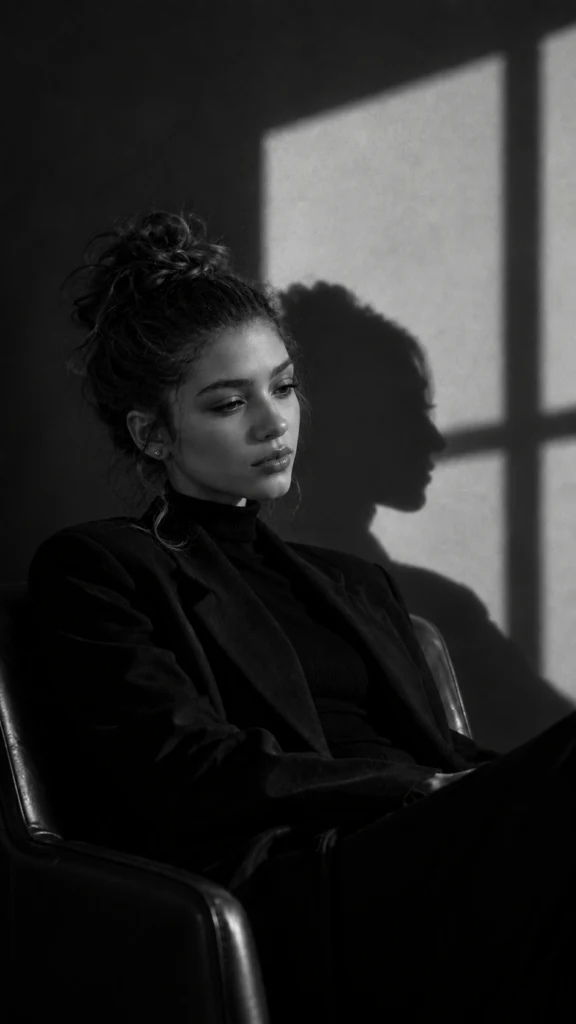
این Prompt نسبت به نمونههای قبلی جزئیات بیشتری دارد و تقریباً مثل یک Brief عکاسی نوشته شده است. زاویه دوربین، محل نور، جهت سایه و حتی وضعیت بدن جداگانه تعریف شدهاند.
گاهی فقط تغییر زاویه دوربین کافی است تا یک تصویر کاملاً متفاوت ساخته شود. در این Prompt دوربین تقریباً عمود بر سوژه قرار دارد.
Prompt:
Replace the face in the reference image with the face of the person from the provided photo. The final image must preserve the exact facial features, structure, hairstyle, and expression of the person in the provided image, with high fidelity and realism. Match the pose and angle to a top-down (nearly 90-degree) perspective. The subject is reclining on a textured cushioned armchair, wearing a sleeveless black shirt. The lighting is soft and diffused, producing subtle shadows along the neck and jawline. The body is slightly rotated, and the face is directed upward toward the camera. No hands or arms should be prominently visible in the frame. The final image must retain a high-contrast black and white style, realistic textures, and a calm, confident atmosphere.
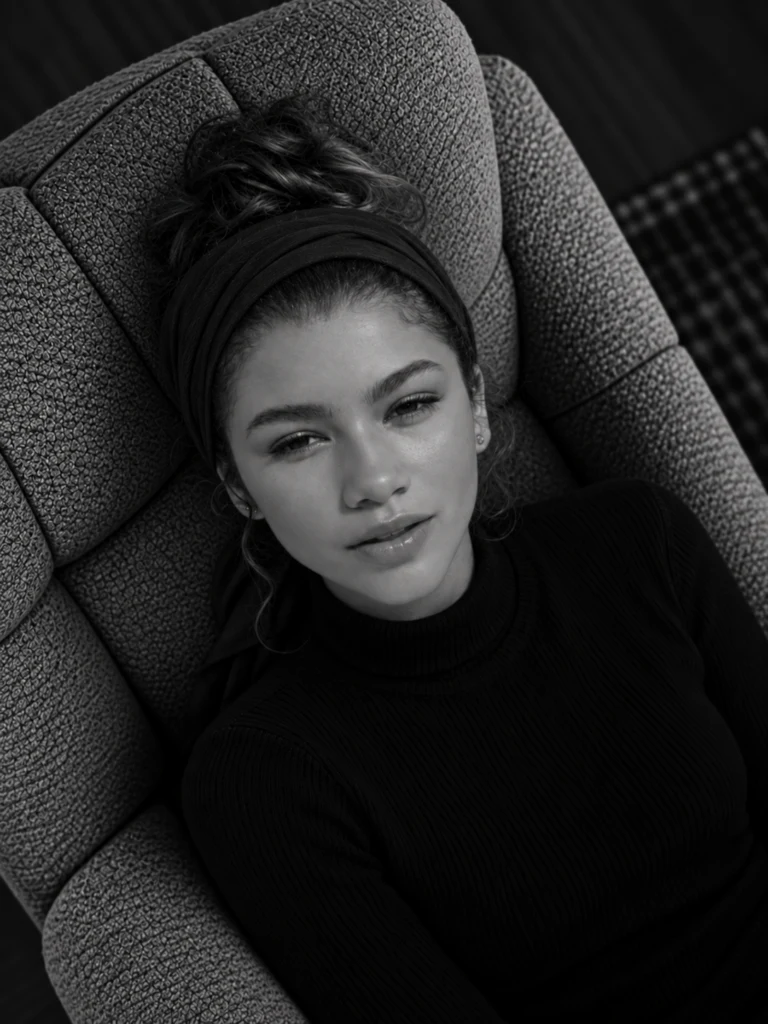
در این نوع Prompt عبارت top-down (nearly 90-degree) perspective بسیار مهم است، چون موقعیت دوربین را دقیقتر برای مدل مشخص میکند.
نوع صندلی، لباس، حالت صورت و حتی میزان Contrast را میتوانید بدون تغییر ساختار اصلی Prompt شخصیسازی کنید.
این نمونه از نظر Texture یکی از متفاوتترین خروجیها را ایجاد میکند. قطرات آب، موهای خیس، بازتاب سطح آب و نور شدید روی چشم باعث میشوند تصویر حس یک عکس سینمایی واقعی پیدا کند.
Prompt:
Create an image
Keep the face in image with all details and Generate a black and white close up portrait showing just the right side of the woman’s face, emerging from water. Her skin and hair should be wet, with visible water droplets and small bubbles. Use dramatic lighting to highlight the illuminated side while leaving the other side in deep shadow.

Emphasize the texture of his skin, stubble, and sharp eye detail. The mood should feel intense and cinematic, with a dark, minimal background. Size 3:5
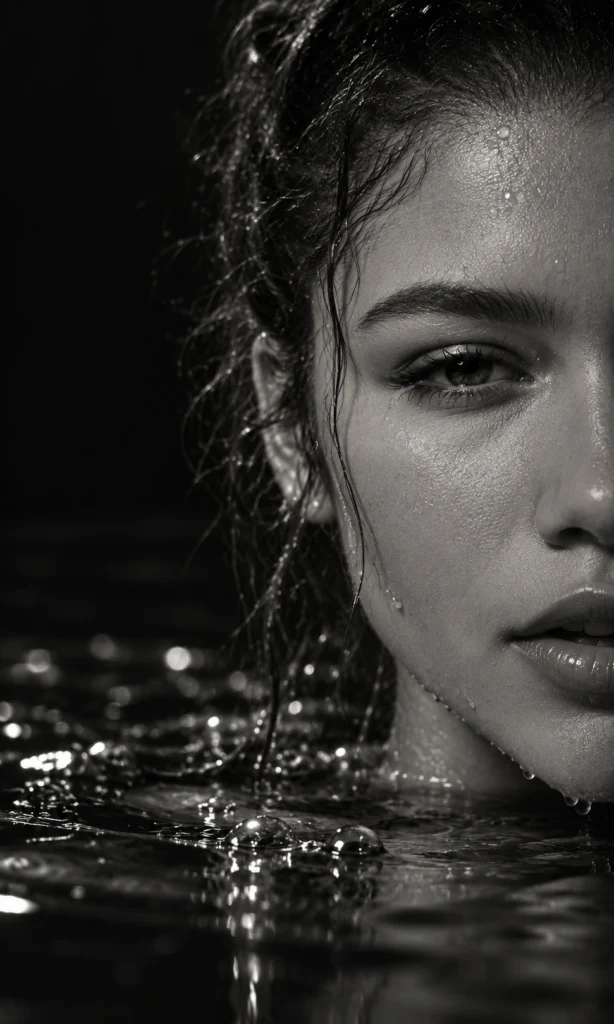
در چنین عکسهایی، تعریف Texture و نور اهمیت بیشتری از نوشتن عبارتهایی مثل 8K دارد. جزئیاتی مثل water droplets، wet hair و sharp eye detail هستند که ظاهر خروجی را مشخصتر میکنند.
این Prompt برای تبدیل یک پرتره معمولی به عکسی با حس Hollywood Glamour طراحی شده است؛ نور استودیویی، زاویه سهربع و کنتراست بالا عناصر اصلی آن هستند.
Prompt:
Create an image
transformation: portrait_angle_change,
source_view: direct_frontal,
target_view: 3/4_angle,
angle_degrees: 45,
style: 1920s_hollywood_glamour,
color_mode: black_and_white,
contrast: high,
lighting: {
type: studio_spot,
effect: chiaroscuro,
highlights: strong_on_one_side,
shadows: deep_on_opposite_side,
reference: george_hurrell_portraits
subject: {
gaze_direction:
slightly_away_from_camera,
preserve: [distinctive_features, facial_expression, identity] technical_details: {
focus: sharp_on_eyes,
skin_texture: smooth_luminous,
finish: silver_gelatin_print_appearance },
mood: timeless_elegant_dramatic,
purpose: showcase_facial_dimension
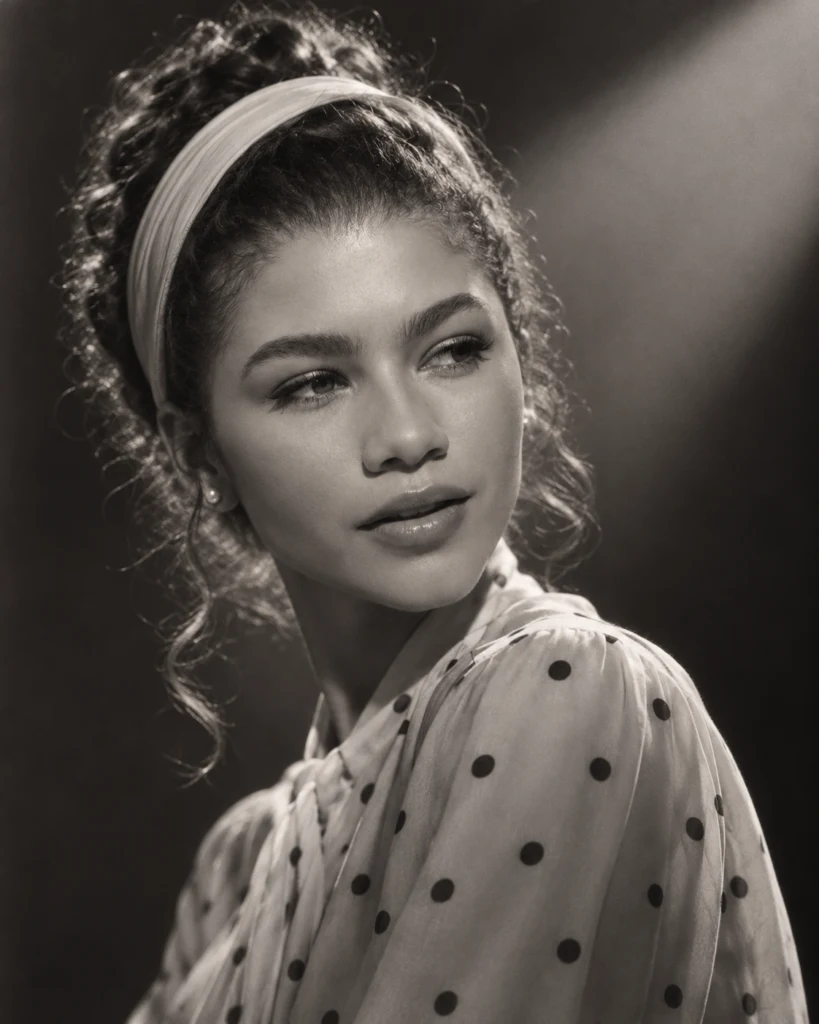
این Prompt متفاوت است چون بهجای متن معمولی، ساختاری شبیه پارامترهای فنی دارد. مهمترین قسمتهای آن زاویه ۴۵ درجه، نور Chiaroscuro، تمرکز روی چشم و ظاهر Silver Gelatin Print هستند.
برای استفاده از هر پرامپت ساخت عکس با هوش مصنوعی بهتر است ابتدا یک تصویر مرجع واضح انتخاب کنید. چهره باید قابل تشخیص باشد و نور خیلی شدید یا سایه سنگین، جزئیات صورت را از بین نبرده باشد.
بعد از آپلود تصویر، Prompt را وارد کنید و بهجای بازنویسی کامل آن، فقط متغیرهایی را تغییر دهید که روی نتیجه موردنظر شما اثر دارند:
اگر خروجی اول دقیق نبود، لازم نیست کل Prompt را عوض کنید. بهتر است همان متغیری را که نتیجه مطلوبی نداده اصلاح کنید. این روش کمک میکند بفهمید هر بخش از Prompt دقیقاً چه اثری روی خروجی دارد.
عبارتی مثل «یک عکس حرفهای بساز» اطلاعات مشخصی درباره نور، زاویه دوربین، محیط یا Mood تصویر به مدل نمیدهد.
نوشتن چند سبک، چند زاویه یا چند نوع نور که با هم سازگار نیستند میتواند خروجی را نامنسجم کند. اگر دو دستور با هم تعارض دارند، بهتر است یکی را حذف یا دقیقتر کنید.
این عبارتها میتوانند بخشی از Prompt باشند، اما Composition، Lighting، Camera Angle و جزئیات واقعی صحنه معمولاً نقش مهمتری در ظاهر خروجی دارند.
اگر برای اولین بار از پرامپت ساخت عکس با هوش مصنوعی استفاده میکنید، Prompt شماره ۱ یا ۲ نقطه شروع سادهتری است. ساختار آنها روشن است و میتوانید بدون تغییر کل Prompt، لباس، محیط یا نور را شخصیسازی کنید.
برای خروجیهای هنریتر، Prompt شماره ۴، ۶ و ۷ گزینههای متفاوتتری هستند؛ چون کنترل بیشتری روی نورپردازی، Composition و فضای کلی تصویر دارند.
یک پرامپت ساخت عکس با هوش مصنوعی خوب فقط درباره ظاهر سوژه نیست. نور، زاویه دوربین، Composition، لباس، محیط و حس تصویر تعیین میکنند خروجی چقدر به چیزی که در ذهن دارید نزدیک شود.
این ۷ Prompt را میتوانید بهعنوان نقطه شروع استفاده کنید. یکی را روی تصویر خودتان امتحان کنید و بعد متغیرهایی مثل لباس، نور، زاویه دوربین و لوکیشن را یکییکی تغییر دهید تا دقیقتر بفهمید هر بخش چه اثری روی خروجی دارد.
اگر هدفتان استفاده حرفهایتر از Gemini است، راهنمای خرید Google AI Pro را هم بخوانید تا قبل از ارتقا، محدودیتها و امکانات پلن را بررسی کنید.
برای آشنایی بیشتر با ChatGPT، Claude، Gemini و سایر سرویسهای هوش مصنوعی میتوانید مقاله راهنمای خرید اکانت هوش مصنوعی را مطالعه کنید.
همچنین اگر در حال مقایسه نسخه رایگان و پولی Gemini هستید، مقاله تفاوت Gemini رایگان و Google AI Pro میتواند به تصمیمگیری دقیقتر کمک کند.
 ←
←
خرید اشتراک Google AI Pro فقط به معنی دسترسی به نسخه قویتر Gemini نیست. این پلن مجموعهای از امکانات هوش مصنوعی، فضای ذخیرهسازی Google One و قابلیتهایی در بعضی سرویسهای Google…
 ←
←
تفاوت Gemini رایگان و Google AI Pro فقط به این خلاصه نمیشود که یکی «قویتر» از دیگری است. سقف استفاده، Context Window، Deep Research، تولید تصویر و ویدئو، فضای ذخیرهسازی و بعضی ق…
 ←
←
خرید اکانت Claude Pro زمانی ارزش بیشتری پیدا میکند که Claude به بخشی ثابت از کار، مطالعه، تحلیل، برنامهنویسی یا تولید محتوای شما تبدیل شده باشد. اگر فقط گاهی یک سؤال کوتاه میپرس…
نظر شما درباره این مطلب چیست؟
دیدگاههای این نسخهٔ لوکال فقط در همین مرورگر نگهداری میشوند.